
Practice PT Skills Assessment (PTSA)
ITN ( Version 7.00) – ITN Practice PT Skills Assessment (PTSA)
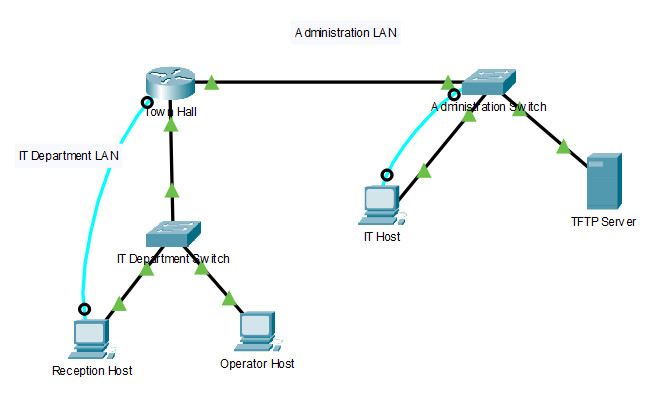
(Same)
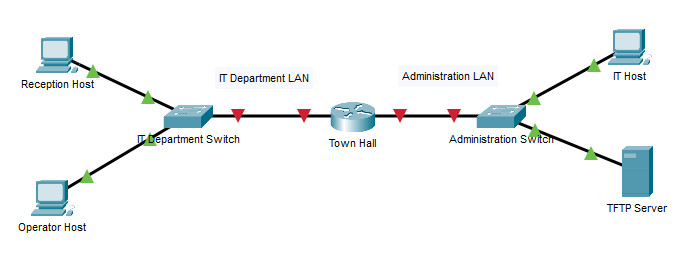
CCNA1 v7.0: ITN Practice PT Skills Assessment (PTSA) – TYPE 2
Type 2 (just different names devices)
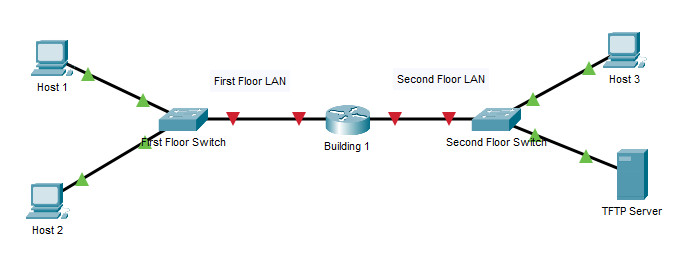
Evaluación de habilidades prácticas de ITN: respuestas de Packet Tracer
Algunas cosas a tener en cuenta al completar esta actividad:
- No utilice el botón Atrás del navegador ni cierre ni vuelva a cargar ninguna ventana de examen durante el examen.
- No cierre Packet Tracer cuando haya terminado. Se cerrará automáticamente.
- Haga clic en el botón Enviar evaluación en la ventana del navegador para enviar su trabajo.
Introducción
En esta evaluación, configurará dispositivos en una red IPv4 / IPv6. Por cuestiones de tiempo, no se le pedirá que realice todas las configuraciones en todos los dispositivos de red, como se le puede solicitar que haga en una red real u otra evaluación. En su lugar, utilizará las habilidades y los conocimientos que ha aprendido en los laboratorios y los rastreadores de paquetes de este curso para configurar el enrutador Town Hall. Además, dirigirá los hosts en dos LAN con direcciones IPv4 e IPv6 y activará y dirigirá la interfaz de administración del conmutador de administración.
Recibirá una de varias topologías.
No es necesario que configure el conmutador del departamento de TI y no podrá acceder a él en esta actividad práctica de evaluación de habilidades.
Todas las configuraciones de dispositivos IOS deben completarse desde una conexión de terminal directa a la consola del dispositivo. Además, no se le han proporcionado muchos valores necesarios para completar las configuraciones. En esos casos, cree los valores que necesita para completar los requisitos. Para los valores que se le han proporcionado, deben introducirse exactamente como aparecen para que pueda obtener el crédito completo por su configuración.
Practicarás y serás evaluado en las siguientes habilidades:
- Configuración de la configuración inicial del dispositivo IOS
- Diseño y cálculo de direccionamiento IPv4
- Configuración de las interfaces del dispositivo IOS, incluido el direccionamiento IPv4 e IPv6 cuando corresponda
- Direccionamiento de hosts de red con direcciones IPv4 e IPv6
- Mejora de la seguridad del dispositivo, incluida la configuración del protocolo de transporte seguro para la configuración del dispositivo remoto
- Configuración de una interfaz de gestión virtual de conmutadores
Requirements by device:
Town Hall router (or Building 1 router):
- Configuración de la configuración inicial del enrutador
- Configuración de interfaz y direccionamiento IPv4 e IPv6
- Mejora de la seguridad del dispositivo o refuerzo del dispositivo
- Transporte seguro para conexiones de configuración remota como se describe en las prácticas de laboratorio y Packet Tracers del curso.
Administration Switch (or Second Floor Switch):
– Habilitación de la administración remota básica por Telnet
– Host de PC y servidor:
- Direccionamiento completo IPv4
- Direccionamiento IPv6
Addressing Table
| Device | Interface | IPv4 Address | Subnet Mask | IPv4 Default Gateway |
|---|---|---|---|---|
| IP v6 Address | IPv6 Default Gateway | |||
| Town Hall (or Building 1) | G0/0 | 192.168.1.126 | 255.255.255.224 | N/A |
| 2001:DB8:ACAD:A::1/64 | N/A | |||
| G0/1 | 192.168.1.158 | 255.255.255.240 | N/A | |
| 2001:DB8:ACAD:B::1/64 | N/A | |||
| Link Local | FE80::1 | N/A | ||
| Administration Switch (or Second Floor Switch) | Vlan 1 | 192.168.1.157 | 255.255.255.240 | 192.168.1.158 |
| N/A | N/A | N/A | ||
| Reception Host (or Host 1) | NIC | 192.168.1.97 | 255.255.255.224 | 192.168.1.126 |
| 2001:DB8:ACAD:A::FF/64 | FE80::1 | |||
| Operator Host (or Host 2) | NIC | 192.168.1.98 | 255.255.255.224 | 192.168.1.126 |
| 2001:DB8:ACAD:A::15/64 | FE80::1 | |||
| IT Host (or Host 3) | NIC | 192.168.1.145 | 255.255.255.240 | 192.168.1.158 |
| 2001:DB8:ACAD:B::FF/64 | FE80::1 | |||
| Server | NIC | 192.168.1.146 | 255.255.255.240 | 192.168.1.158 |
| 2001:DB8:ACAD:B::15/64 | FE80::1 | |||
Instructions
Step 1: Determine the IP Addressing Scheme.
Design an IPv4 addressing scheme and complete the Addressing Table based on the following requirements. Use the table to help you organize your work.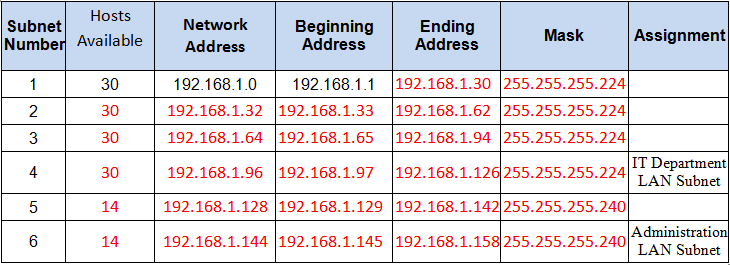
- a.Subnet the 192.168.1.0/24 network to provide 30 host addresses per subnet while wasting the fewest addresses.
- b.Assign the fourth subnet to the IT Department LAN. (or First Floor LAN)
- c.Assign the last network host address (the highest) in this subnet to the G0/0 interface on Town Hall (or Building 1).
- d.Starting with the fifth subnet, subnet the network again so that the new subnets will provide 14 host addresses per subnet while wasting the fewest addresses.
- e.Assign the second of these new 14-host subnets to the Administration LAN (or Second Floor LAN).
- f.Assign the last network host address (the highest) in the Administration LAN (or Second Floor LAN) subnet to the G0/1 interface of the Town Hall router (or Building 1 router).
- g.Assign the second to the last address (the second highest) in this subnet to the VLAN 1 interface of the Administration Switch. (or Second Floor Switch)
- h.Configure addresses on the hosts using any of the remaining addresses in their respective subnets.
Step 2: Configure Host Addressing
a. Use the IPv4 addressing from Step 1 and the IPv6 addressing values provided in the Addressing Table to configure all host PCs with the correct addressing.
b. Use the router interface link-local address as the IPv6 default gateways on the hosts.
c. Complete the configuration of the server using the IPv4 addressing values from Step 1 and the values in the addressing table
Step 3: Configure the Town Hall (or Building 1) Router.
a. Configure the Town Hall router with all initial configurations that you have learned in the course so far:
- Configure the router hostname: Middle or Building-1 or Town-Hall
- Protect device configurations from unauthorized access with the encrypted privileged exec password.
- Secure all access lines into the router using methods covered in the course and labs.
- Require newly-entered passwords to have a minimum length of 10 characters.
- Prevent all passwords from being viewed in clear text in device configuration files.
- Configure the router to only accept in-band management connections over the protocol that is more secure than Telnet, as was done in the labs and PT activities. Use the value 1024 for encryption key strength.
- Configure local user authentication for in-band management connections. Create a user with the name netadmin and a secret password of Cisco_CCNA7.
b. Configure the two Gigabit Ethernet interfaces using the IPv4 addressing values that you calculated and the IPv6 values provided in the addressing table.
- Reconfigure the link local addresses to the value shown in the table.
- Document the interfaces in the configuration file.
Step 4: Configure the Administration Switch (or Second Floor Switch).
Configure Administration Switch (or Second Floor Switch) for remote management over Telnet.
- a. Configure VLAN 1 as the SVI.
- b. Configure IPv4 addressing according to your work in Step 1.
- c. Be sure that the switch is able to accept connections from hosts on other networks.
Answers – Passed 100% Score (for both types)
IPv4 Address: 192.168.1.97
IPv4 Subnet mask: 255.255.255.224
IPv4 Default gateway: 192.168.1.126
IPv6 Address: 2001:DB8:ACAD:A::FF/64
IPv6 Default gateway: FE80::1
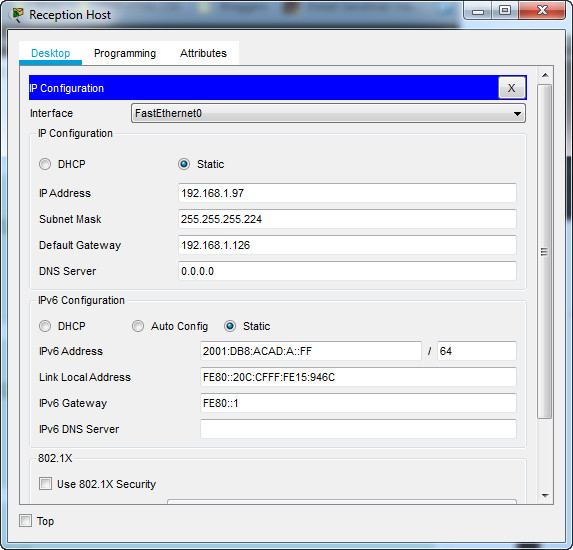
Reception Host IP Configuration
IPv4 Address: 192.168.1.98
IPv4 Subnet mask: 255.255.255.224
IPv4 Default gateway: 192.168.1.126
IPv6 Address: 2001:DB8:ACAD:A::15/64
IPv6 Default gateway: FE80::1
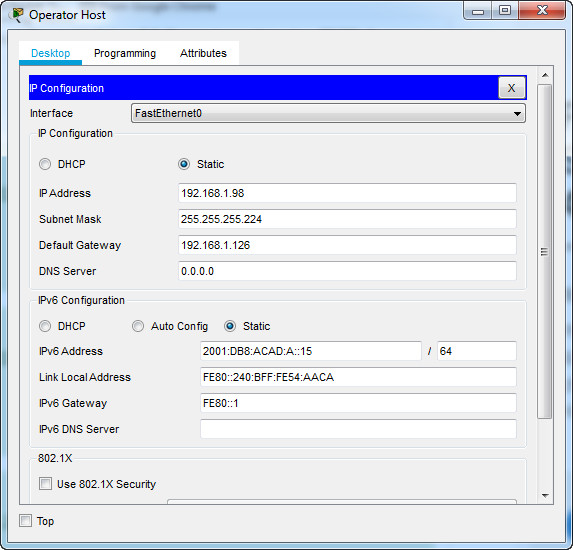
Operator Host IP Configuration
IPv4 Address: 192.168.1.145
IPv4 Subnet mask: 255.255.255.240
IPv4 Default gateway: 192.168.1.158
IPv6 Address: 2001:DB8:ACAD:B::FF/64
IPv6 Default gateway: FE80::1
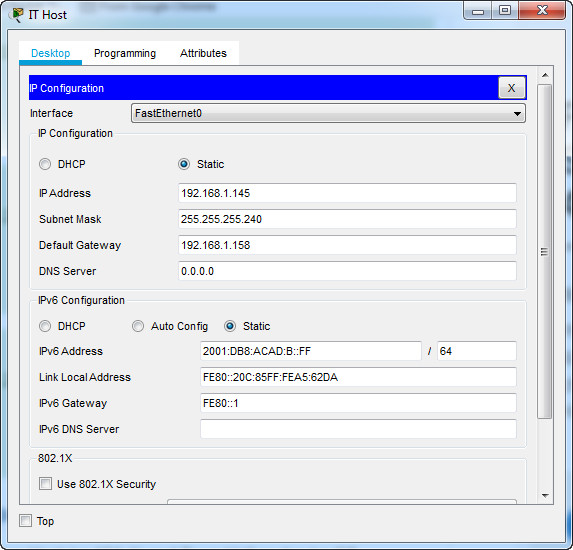
IT Host IP Configuration
IPv4 Address: 192.168.1.146
IPv4 Subnet mask: 255.255.255.240
IPv4 Default gateway: 192.168.1.158
IPv6 Address: 2001:DB8:ACAD:B::15/64
IPv6 Default gateway: FE80::1
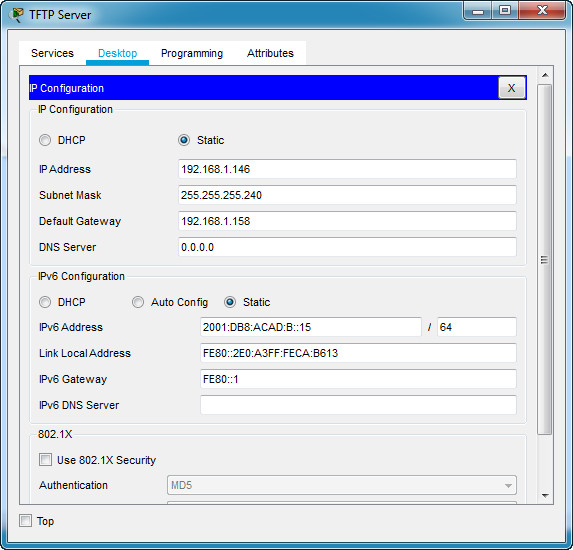
Server IP Configuration
Town Hall router (or Building 1/Town-Hall Router)
Use line console to connect Reception Host (or Host 1) and Town Hall router (or Building 1). On Reception Host (or Host 1), go to “Desktop Tab” –> choice “Terminal”
Note: Please change the hostname router: Middle / Building-1 / Town-Hall
en
conf terminal
hostname Middle (or Building-1) (or Town-Hall)
enable secret class12345
service password-encryption
banner motd $This is Router$
security passwords min-length 10
login block-for 120 attempts 2 within 30
no ip domain-lookup
ip domain-name ITExamAnswers.net
crypto key generate rsa
1024

line console 0
password cisco12345
login
logging synchronous
exec-timeout 60
exit

line vty 0 4
password cisco12345
transport input ssh
login local
logging synchronous
exec-timeout 60
exit

line aux 0
password cisco12345
login
logging synchronous
exec-timeout 60
exit

ip ssh version 2
ip ssh time-out 120
username netadmin privilege 15 secret Cisco_CCNA7

interface g0/0
ip address 192.168.1.126 255.255.255.224
description First Floor LAN
ipv6 address 2001:DB8:ACAD:A::1/64
ipv6 address fe80::1 link-local
no shutdown
exit

interface g0/1
ip address 192.168.1.158 255.255.255.240
description Second Floor LAN
ipv6 address 2001:DB8:ACAD:B::1/64
ipv6 address fe80::1 link-local
no shutdown
exit
ipv6 unicast-routing
exit
write
Administration Switch (or Second Floor Switch)
Use line console to connect IT Host (or Host 3) and Administration Switch (or Second Floor Switch). On IT Host (or Host 3), go to “Desktop Tab” –> choice “Terminal”
enable
conf terminal
enable secret class12345
service password-encryption
banner motd $Second Floor Switch$
no ip domain-lookup

line console 0
password cisco12345
login
logging synchronous
exec-timeout 60
exit

line vty 0 15
password cisco12345
login
logging synchronous
exec-timeout 60
exit

interface vlan 1
ip address 192.168.1.157 255.255.255.240
no shutdown

ip default-gateway 192.168.1.158
exit
write
Descargue el archivo PKA de Packet Tracer:

ITN Practice Skills Assessment Packet Tracer.PK
DESCARGAR

